
What Interior AI actually is
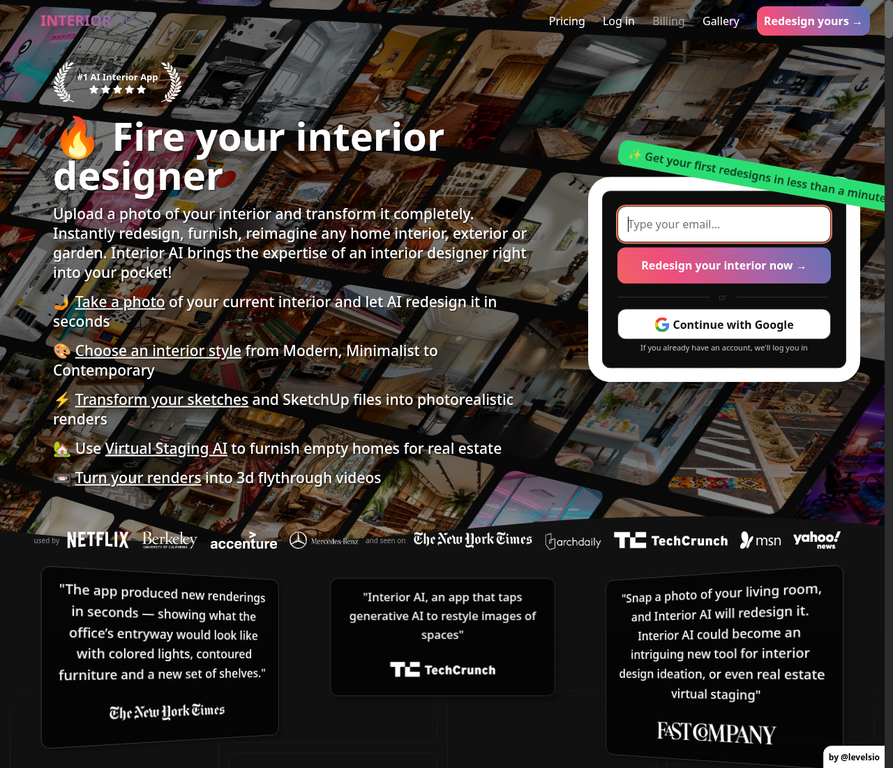
Interior AI is a web app for redesigning interiors (and exteriors/gardens) from photos. After signup you enter a studio with dozens of room types and 50+ style presets. You pick a mode, run renders, often several in parallel, and download results for inspiration, client decks, or listing marketing.
It is not a CAD suite and not a retailer catalog. Like other redesign tools, it invents furniture and finishes inside (or on top of) the structure it reads from your image. The difference versus lighter tools is breadth: dedicated virtual staging, sketch-to-image, SketchUp screenshot rendering, outdoor design, custom prompts, parallel batching, commercial licensing on paid plans, and higher-tier video/VR walkthrough features.
The product is built and operated by Pieter Levels (@levelsio). That indie footprint shows up in rapid feature shipping and in a blunt pricing posture: you pay before you render your own rooms.
How it works and modes
The core loop is short:
- Upload a JPG/PNG/WebP/AVIF photo (HEIC is not supported, convert first).
- Choose room type, style, and mode.
- Generate, typically around 25 seconds per design, with multiple rooms in parallel depending on plan.
Modes matter more than the marketing headline. Per Interior AI's own documentation, the practical split looks like this:
- Interior design with 3D Vision, tries to keep your room's construction while changing style.
- Interior design (2D photo), restyles more aggressively; less faithful to existing furniture volumes.
- Virtual Staging AI, furnishes empty or near-empty spaces while aiming to keep building structure (the real-estate workflow).
- Freestyle, generates interiors from scratch without an input photo.
- Sketch2Image, turns rough interior sketches into photorealistic stills.
- SketchUp, polishes SketchUp screenshots into higher-resolution renders.
- Outdoor design, plants, trees, and garden elements on exterior photos.
Higher plans add Hyper Realism rendering, upscaling/edits, flythrough video, and VR-style walkthrough experiences. Commercial use licensing is included on paid tiers, which matters if you are an agent or designer delivering work to clients.
How it performed
Photorealism and detail
On clean, straight, well-lit inputs, Interior AI produces some of the most convincing consumer redesign stills in this category, sharper and more "magazine finished" than lightweight one-click tools. Empty-room staging is a clear strength: competitors often invent distorted furniture or lose the architecture; Interior AI's staging mode is built specifically for that failure mode.
Mode control
Being able to choose "stick close to construction" versus "be more creative" is more useful than a single magic button. Designers and agents who run the same listing photo through two modes get a controllable spectrum instead of one surprise. Custom prompts and style remixing help when presets are close but not quite right.
Sketch and SketchUp paths
Sketch2Image and SketchUp modes are the features that separate Interior AI from pure consumer toys. A quick hand sketch or a basic SketchUp massing can become a client-readable still without a full rendering pipeline. That is real workflow value for professionals, and mostly irrelevant for a shopper comparing two Wayfair sofas.
Artefacts and overconfidence
Interior AI's own FAQ is unusually honest: generative artefacts still appear, and not every render is usable. Expect illogical furniture, occasional construction weirdness, and room-type inconsistency (bedrooms often look stronger than wet rooms or highly reflective spaces). Treat outputs as proposals, not specifications. Label them clearly before sending to a client or seller, photoreal images read as promises.
Shopping a specific product
Still the wrong job. Even when furniture looks "IKEA-plausible," you are not previewing the exact SKU in your cart. For purchase confidence on a named piece, you need product-in-room placement or a measured layout, not a full-room restyle. See our notes on redesign tool limits and the same-photo tool comparison.
Pros and cons
What we liked
- Breadth of modes (staging, sketch, SketchUp, outdoor) beyond simple restyle.
- Style depth, 50+ presets across many room types.
- Parallel renders so you can compare directions quickly.
- Commercial license on paid plans for professional delivery.
- Strong empty-room staging relative to lighter redesign apps.
- Candid product FAQ about artefacts, photo tips, and refunds.
Where it falls short
- No free tier to test your own photo before paying, the biggest barrier for casual users.
- Monthly cost is steep if you only need a handful of images.
- No refunds (GPU costs; you agree at signup), buy carefully.
- Generated furniture is still not a buyable shortlist of your exact products.
- Web-first, no native mobile app dependency, but also no offline/CAD export workflow.
- Geometry remains approximate, do not treat renders as construction documents.
Pricing
Confirm live pricing on interiorai.com, tiers change, but the structure as publicly listed in 2026 is subscription-only:
- Pro: about $49/month, or roughly $29/month when billed yearly (~$349/year). Includes on the order of 1,000 designs/month, Flux-class rendering, parallel jobs (around four), prompts/remix, and a commercial license. Entry renders are marked as lower quality than Hyper Realism tiers.
- Higher tiers (Premium / Ultra class): step up toward $99–$199/month (with lower effective rates on annual billing) for Hyper Realism / ultra-quality renders, more parallel jobs (up to ~16), virtual staging and video/walkthrough features on the upper plans, priority speed, and much higher monthly design caps.
Yearly billing is heavily discounted (Interior AI markets it as "6+ months free" versus monthly). There is no free plan to generate designs on your own uploads before subscribing. That single fact should drive your decision: if you cannot amortize a month of Pro across real work (listings, client options, renovation directions), wait for a tool with a free trial.
Who it is (and is not) for
Interior AI is a strong fit if you are:
- A real-estate agent or stager who needs empty rooms furnished for marketing, repeatedly.
- An interior designer who wants fast style options, sketch polish, or SketchUp-to-pretty stills for clients.
- A renovator exploring whole-room directions (paint, furniture language, mood) before hiring or buying.
- Anyone who will actually use hundreds of renders a month, the Pro allowance is built for volume.
It is the wrong tool if you:
- Only need to check one or two products before an online order.
- Want a free experiment on your living-room photo tonight.
- Need measured layouts, cut lists, or permit drawings.
- Expect every generated chair to be a cart link.
Verdict and rating
Interior AI is one of the most complete consumer-facing AI interior studios available in 2026 if your job is ideation, staging, or client visuals. It is also priced and gated like a professional utility, not a weekend curiosity. The lack of a free tier is not a footnote, it is the product filter.
Editorial rating: 4 / 5 for professionals and frequent users. Closer to 2.5 / 5 as a one-time homeowner shopping tool, where the subscription is overkill and the output still will not confirm a specific SKU.
Match the tool to the question. Style and staging? Interior AI earns the spend. "Will this exact sofa look right in my room?" Use a product-placement workflow instead, and read the category caveats in our redesign honest look before you trust any photoreal still too far.