
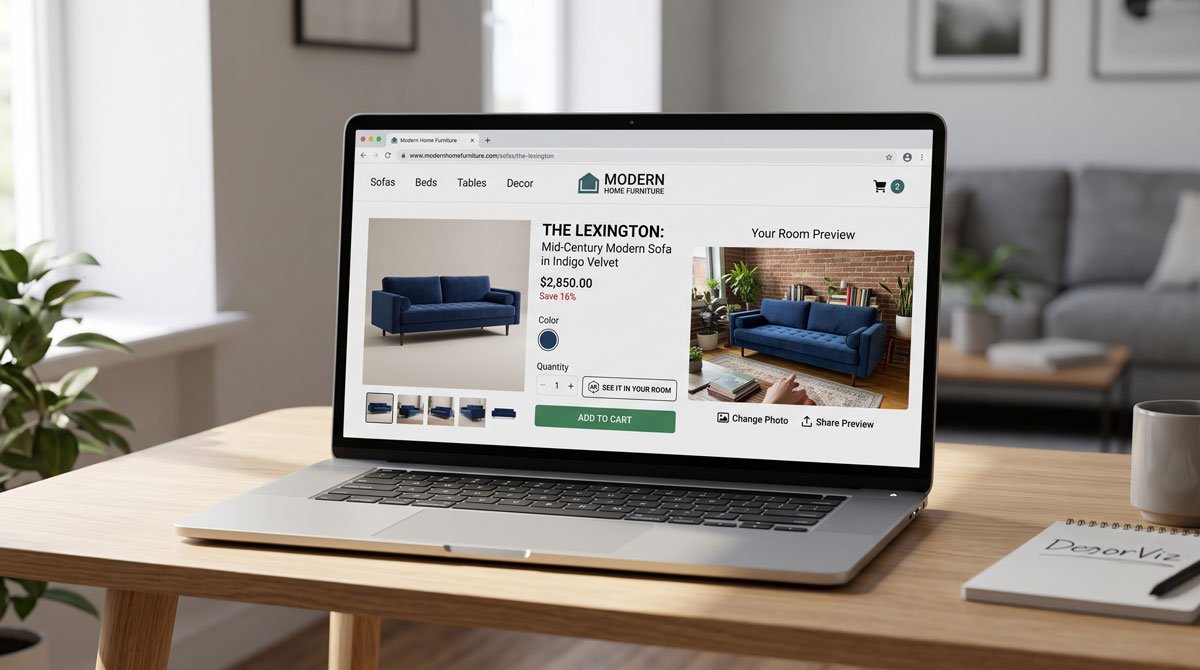
What DecorViz Storefront is
DecorViz Storefront is the business (B2B) version of DecorViz. Instead of a consumer visiting a visualizer site, the visualizer lives inside your store. It adds a "See in Your Room" button to your product pages; when a shopper clicks it, they upload a photo of their room and see your product composited into their actual space, powered by your merchant account, not theirs.
Crucially, it uses the product photos you already have. There are no 3D models to build, no per-product setup, and no AR scanning. One script covers your whole catalog. If you want the shopper-side consumer tool instead, see our DecorViz review.
The shopper experience
From the customer's side the flow is deliberately frictionless, which is the whole point:
- They click "See in Your Room" directly on your product page.
- They upload a photo of their room, with no DecorViz account, no app download, no payment.
- The widget generates a photorealistic preview of your product in their space, adapted to their lighting.
Because there is no signup wall and no DecorViz branding in the way, it feels like a native feature of your store. That matters: every extra step between a hesitant shopper and reassurance is a chance to lose the sale. Shopper room photos are used only to generate the preview and are not exposed to the merchant, which is a sensible privacy stance to be able to point to.
The problem it targets
Furniture is a high-consideration purchase with a structural weakness online: shoppers cannot tell whether that sofa, rug, or bed will work in their room. That uncertainty shows up as three costs:
- Cart abandonment. The bigger the price tag, the bigger the doubt, and doubt kills conversions.
- Mismatch returns. The number-one reason furniture comes back is "it looked different than expected," and furniture returns run roughly $50–$200 per item in shipping, restocking, and lost margin.
- Slow decision cycles. Weeks of "let me think about it" give competitors time to win the sale.
Storefront attacks all three by replacing imagination with visual confirmation at the exact moment of hesitation.
Does the ROI math hold up?
This is where a merchant review has to be honest, and the case is genuinely favorable because the break-even is so low. DecorViz frames it simply: if the widget prevents just a few mismatch-driven returns per month, it has already paid for itself. Run the numbers for your own store:
- Return cost avoided: at $50–$200 per prevented return, stopping even 3–5 returns a month recovers roughly $150–$1,000 in otherwise-lost margin.
- Conversion upside: any hesitant browser who converts because they could "see it" is incremental revenue on top of the return savings.
- Soft benefits: fewer support tickets, fewer angry reviews, and happier customers who got what they expected.
The reason the math is compelling is asymmetry: the subscription cost is a fraction of what a single prevented return saves, so you do not need a dramatic behavior change for it to be net positive. The honest caveat is that actual results depend on your catalog, price points, and current return rate, so treat the vendor's example figures as a framework to plug your own numbers into, not a guarantee.
Setup and integration
Setup is the strongest practical selling point. Storefront works with Shopify, WooCommerce, Wix, Squarespace, and custom-coded sites via a standard integration script. The process is: enable Storefront in your DecorViz dashboard, set your domain, paste one script into your theme, and verify on a live product page. Most owners finish in a single session, typically under five minutes.
Two details worth flagging for merchants: the script loads asynchronously, so it should not drag down page-load speed or Core Web Vitals, and it automatically detects the product image on each page, so there is no product-by-product configuration. One install scales across sofas, tables, rugs, lighting, and the rest of the catalog.
Pricing and plan
Storefront is available on DecorViz's Ultra plan, which (at the time of writing) includes 120 previews per month, best-quality output, fastest processing, priority support, and API access. Each shopper preview consumes one credit from that monthly allocation.
That preview cap is the number to watch. For a boutique or mid-volume furniture store, 120 previews a month is plenty. For a very high-traffic store where a large share of visitors would use the button, you will want to confirm current limits and any overage options with DecorViz before rolling it out site-wide. As always, verify live pricing on their site since plans change.
Honest limitations
- Metered previews. The monthly preview allocation can be a real constraint at high traffic, so model your expected usage first.
- Photo-based, not 3D. The result is a realistic room-context image, not an interactive 3D object shoppers can spin. For most furniture buying decisions that is an advantage, but it is a different experience from AR.
- Output depends on the shopper's photo. A poorly lit or badly angled room photo yields a weaker preview, something you cannot fully control.
- Plan gate. Access requires the Ultra tier, so it is not an add-on you can bolt onto the cheapest plan.
Who should use it
Storefront is a strong fit if you:
- Sell higher-ticket furniture or decor where "will it work in my room?" is the main purchase blocker.
- Have a measurable return rate driven by "looked different than expected."
- Run on Shopify (or a supported platform) and want a near-zero-effort conversion experiment.
It is less compelling if you sell low-cost items where returns are cheap and hesitation is minimal, or if you expect preview volume to blow past the plan's monthly allocation without a viable upgrade path.
For most Shopify furniture retailers, though, the combination of five-minute setup, zero customer friction, and a return-reduction case that breaks even after a handful of prevented returns makes it a sensible, low-risk thing to test. New to the setup? See our guide to adding a furniture visualizer to your Shopify store.